
Introduction
This documentation needs work. See "Help improve this page" in the sidebar.
Overview
First, we want to provide an overview of our solution and explain the basic architecture.
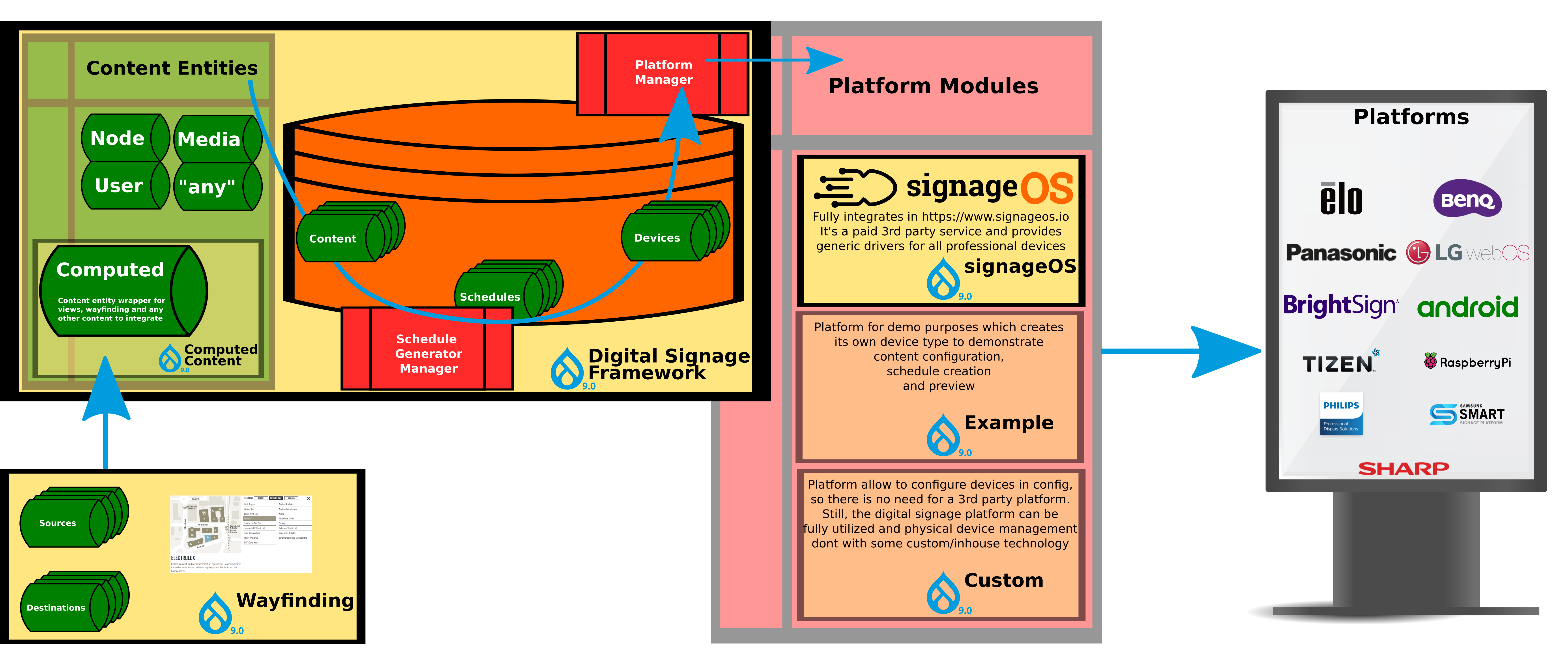
The first important point to mention is, that any content entity can be published. This solution also provides a submodule called Computed Content, which is a wrapper for views and any other content. In the Digital Signage Framework there are three content entities involved. Of course there is the content to be published, schedules and devices.
Schedules
This content entity represents the order of sequence items displayed on a device. The schedule is calculated by a plugin of the Schedule Generator Manager. This module provides a default implementation. Please find out more information here.
Devices
The device can be any display or electronic label, you want to push content to. Every device has a lot of properties and a specific type, which is a configuration entity. Please find out more here.
This modules comes with Custom Platform and an Example module to get a first impression how the solution is working. If you want to go into production, you need a Digital Signage Platform provider. This solution is extendible for every provider by implementing a specific plugin for the Platform Manager. This framework provides the basic functionality and you can implement you own module. How to do this, please visit our detailed architecture documentation.
So far so good. Below you find more information about the module itself. If you can`t wait to get started, please klick here.
Features
- Bring content to multiple devices
- Push every content to user-defined devices
- Push views via computed contents to user-defined devices
- Style your content for digital signage
- Extensibility
- Extend your solution with a signage provider of your choice
- Configure the calculation of a schedule to fit your requirements
- Implement your own schedule (playlist) calculator
- Fast Preview
- See the result immediately with a device preview function
- Print the calculated schedule in a sequence diagram
Submodules
The module has several submodules.
The DSF provides several optional modules you have to enable manually.
- Computed Content: Content Entity wrapper to provide views for Digital Signage treated like a normal content
- Menu:
Content -> Computed contentfor listing all computed contents
- Views
Structure - ViewsProvides displayDigital Signage
- Menu:
- Custom: Provides a local Digital Signage Platform with two preconfigured devices
- Example: Provides six preconfigured devices
signageOS Platform Provider
We already developed a module for integrating with the Digital Signage platform provider signageOS. Nearly all available features, the platform provides, are implemented. You will find more information here.
Useful Add-On
A very useful add-on to Digital Signage is the module Wayfinding. It fits perfectly into the environment and provides extremely powerful widgets.
Maintainers
The DSF is actively maintained and we're looking for feedback and contributors all the time. The more people participate the better. You can get in touch and involved in various ways:
- Discuss and improve documentation: this is right here. Use either the comments or edit the pages directly, what ever you'd like to contribute is always welcome.
- The maintainers can be contacted through their Drupal profile:
- jurgenhaas: Jürgen Haas
- danielspeicher: Daniel Speicher
Help improve this page
You can:
- Log in, click Edit, and edit this page
- Log in, click Discuss, update the Page status value, and suggest an improvement
- Log in and create a Documentation issue with your suggestion
