
Place Blocks overview
Last updated on
27 November 2022
The Place Blocks module allows you to place blocks from every page, except for Administration pages. You can initiate a Place Block workflow by the clicking on the Toolbar item. Once active all regions in the theme will show the "plus sign" button at the top of each region.
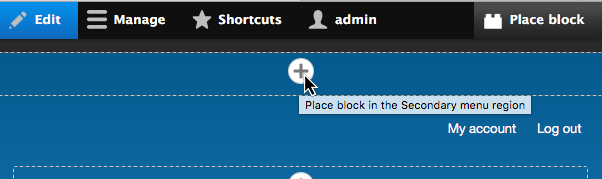
Clicking the button will bring up the block modal selection UI. There you can choose which block instance to use and set it's configuration options. Block placement is specific to each theme on your site, as per the Block API.
This module is included in Drupal 8 core since Drupal 8.2 It was marked as hidden since Drupal 8.4, deprecated in Drupal 8.8.0 and finally removed in Drupal 9.
Help improve this page
Page status: No known problems
You can:
You can:
- Log in, click Edit, and edit this page
- Log in, click Discuss, update the Page status value, and suggest an improvement
- Log in and create a Documentation issue with your suggestion
