
Configure aliases
Configure aliases that are used to refer to the following components in the developer portal, including the singular and plural form:
- API products. The defaults are API and APIs, respectively.
- Applications. The defaults are App and Apps, respectively.
- Teams. The defaults are Team and Teams, respectively.
- Team applications. The defaults are Team App and Team Apps, respectively.
Configure the alias for API products
Configure the alias that is used to refer to API products in the developer portal, including the singular and plural form. The defaults are API and APIs, respectively.
To configure the alias for API products:
- Select Configuration > Apigee > API Products.
- Click the Alias tab.
- In the How to Refer to an API product in the UI section, set the desired singular and plural values, respectively, in the following fields:
- Singular format. This field defaults to API.
- Plural format. This field defaults to APIs.
- Click Save configuration.
Configure the alias for developer applications
Configure the alias that is used to refer to developer applications in the developer portal, including the singular and plural form. The defaults are App and Apps, respectively.
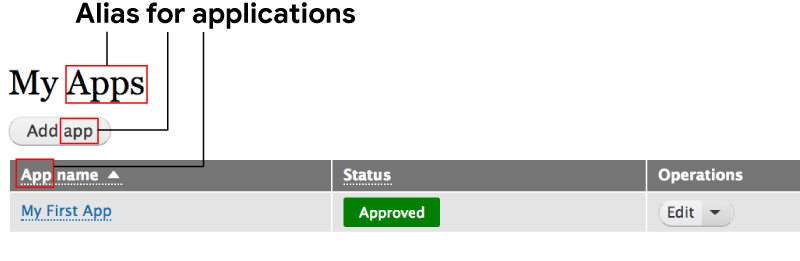
To configure the alias for applications:
- Select Configuration > Apigee > Apps > Developer Apps.
- Click the Alias tab.
- In the How to Refer to a Developer App on the UI section, set the desired singular and plural values, respectively, in the following fields:
- Singular format. This field defaults to App.
- Plural format. This field defaults to Apps.
- Click Save configuration.
Configure the alias for teams
Configure the alias that is used to refer to teams in the developer portal, including the singular and plural form. The defaults are Team and Teams, respectively.
To configure the alias for teams:
- Select Configuration > Apigee > Teams.
- Click the Alias tab.
- In the How to Refer to a team on the UI section, set the desired singular and plural values, respectively, in the following fields:
- Singular format. This field defaults to Team.
- Plural format. This field defaults to Teams.
- Click Save configuration.
Configure the alias for team applications
Configure the alias that is used to refer to team applications in the developer portal, including the singular and plural form. The defaults are Team App and Team Apps, respectively.
To configure the alias for applications:
- Select Configuration > Apigee > Apps > Team Apps.
- Click the Alias tab.
- In the How to Refer to a Developer App on the UI section, set the desired singular and plural values, respectively, in the following fields:
- Singular format. This field defaults to Team App.
- Plural format. This field defaults to Team Apps.
- Click Save configuration.
Help improve this page
You can:
- Log in, click Edit, and edit this page
- Log in, click Discuss, update the Page status value, and suggest an improvement
- Log in and create a Documentation issue with your suggestion
